
Most desk advice is a shopping list in a random order. This is the same six things in the order that helps, which turns out to matter more than which brand you pick.
The headline number, since it is the one people arrive looking for: an Apple Studio Display is £1,499 and Apple does not discount it. A 27-inch 4K panel from Dell is £347.33. That is the widest gap on this page by a distance. It is also the only one where a straight comparison is honest. We deal with it properly below, rather than pretending the other five have equivalents.
Fix the height before the pixels
The cheapest meaningful upgrade at a desk is not a screen. It is getting the screen you already own to the right height.
Looking down at a laptop for eight hours is the thing your neck objects to, and no resolution fixes it. A stand or an arm costs under eighty pounds and changes how the day feels; a sharper panel at the wrong height changes nothing except how nice the wrong height looks.
So the order below is deliberate: height, then connection, then the screen itself, then the extras.
1. Get the screen to eye level
Ergotron Neo-Flex Notebook Lift Stand: £86.28

Lifts a laptop up to 152mm and holds 6.4kg, which covers any laptop made. It also means using a separate keyboard, because a raised laptop's own keyboard is now at the wrong height too. That is not a hidden cost so much as the point: the two changes work together.
Best for: anyone still working directly on a laptop.
Neomounts FPMA-D025BLACK Monitor Arm: £87.14

Takes a monitor up to 30 inches and 12kg on a grommet mount. Two things it gives you: the right height, and the desk space the stock stand was occupying. Check your monitor has a 75x75 or 100x100 VESA pattern on the back before ordering, because a surprising number of cheap screens do not.
Best for: anyone with a monitor sitting on the stand it came with.
2. Make one cable do everything
StarTech Dual-Monitor USB 3.0 Docking Station: £58.23

Two monitors, wired ethernet, audio and USB peripherals down one cable to the laptop. The value here is not performance, it is that arriving at the desk becomes one connection rather than five, and a setup you can disconnect in a second is a setup you will actually use.
Best for: anyone who moves a laptop between a desk and somewhere else.
3. Then the screen
Dell 27" Plus 4K Monitor S2725QS: £347.33

27 inches at 3840x2160, currently 7% off. This is the one with a famous rival, so here is the comparison stated fairly rather than flatteringly.
What you give up against a £1,499 Studio Display: Apple's panel is 5K, 5120x2880, which is meaningfully sharper at this size, not a marketing number. It also has a built-in camera, speakers and microphones, and charges a MacBook down the same cable. The Dell has none of that.
What you keep: 27 inches of 4K, which is comfortably enough for text to look clean, at roughly a fifth of the price. Add the webcam below and a set of desk speakers and you have replaced the parts of the Apple that most people use, with change from six hundred pounds.
Best for: almost everyone. The Studio Display earns its money from people doing colour work on a Mac, and that is a smaller group than its sales suggest.
4. The extras
Logitech C922 Pro Stream Webcam: £91.50

1080p at 30fps, or 720p at 60. Currently 22% off. A separate camera sits at eye level on top of the monitor, which is the flattering angle, rather than below your chin where a laptop camera lives.
Best for: anyone whose calls currently show the ceiling.
Anker Powercore 20000mAh 30W: £58.60
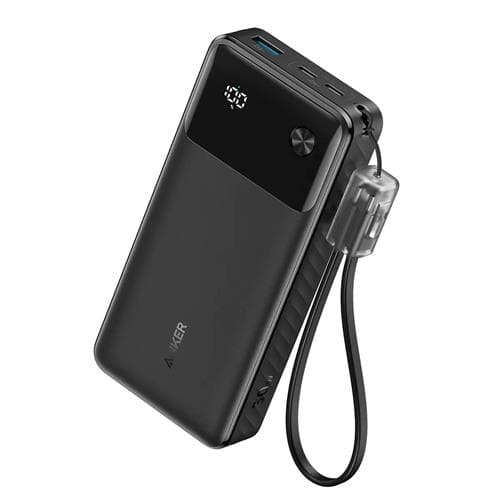
20000mAh at 30W with Power Delivery, 8% off. Not a desk item exactly, which is why it is last: 30W will charge a phone quickly and trickle a laptop, but it will not run a laptop under load.
Best for: working somewhere without a socket, occasionally.
What to buy in what order
| Order | Item | Fixes | Price |
|---|---|---|---|
| 1 | Laptop stand or monitor arm | Neck and desk space | £86.28 / £87.14 |
| 2 | Docking station | Five cables becoming one | £58.23 |
| 3 | 27" 4K monitor | Screen size and sharpness | £347.33 |
| 4 | Webcam | The up-the-nose call angle | £91.50 |
| 5 | Power bank | Working away from a socket | £58.60 |
| n/a | Apple Studio Display | All of 3 and 4, plus 5K and speakers | £1,499 |
Every item on rows one and two costs less than the monitor and will be noticed more. That is the whole argument of this page.
Frequently asked
Is 4K enough at 27 inches, or do I need 5K? 4K at 27 inches is about 163 pixels per inch, which is sharp enough that text looks clean and you stop thinking about it. 5K is sharper and you would see it side by side. Whether you would see it a week later, working alone, is a different question and the honest answer for most people is no.
Do I need a monitor arm if the monitor came with a stand? Only if the stand puts the screen at the wrong height, which most do, or if you want the desk space back. It is a comfort and space upgrade, not a picture one.
Will the dock charge my laptop? This one is USB 3.0 for display and peripherals, not a modern USB-C power delivery dock. If charging over the same cable matters to you, that is a different and more expensive category, and worth knowing before ordering.
Is a separate webcam better than the one in my laptop? Usually yes, and mostly because of where it sits rather than the sensor. A camera above the screen looks at your face. A laptop camera looks up at your chin and your ceiling.
What about a chair? It matters more than everything on this page put together, and we have written about that separately.
How we chose these
Our own prices are read live from the retailer as this page loads, so they are current rather than whatever they were when this was written.
The Apple figure is Apple's own published UK price, linked above. It is one of the few premium numbers we quote that does not need re-checking constantly, because Apple does not discount its own hardware and third-party sellers rarely move far from it.
We have not tested these against each other. The ordering above is not a performance ranking and does not pretend to be. It is an argument about sequence, based on which changes people notice, and you are free to disagree with it. What is not in dispute is what each item costs, what it physically does, and the specification gap between a 4K panel and a 5K one.
Where a discount appears it is one the tracker recorded against a price the product genuinely sold at, rather than a permanent sale price that was never anything else.
The bottom line
If you are working on a laptop on a desk, buy the stand first and be surprised by how much it helps.
If you already have a monitor at the wrong height, the arm before anything else.
And if you were about to spend £1,499 on a display, the Dell plus the webcam covers most of what you would use for around a quarter of it. The rest of the desk lives under Electronics & Tech.