
Mechanical keyboards have a reputation for being expensive, and a lot of the time that's fair. But the gap between a budget board and a premium one has narrowed a lot in the last few years. Some budget picks now use genuinely good switches and a solid build; they just skip extras like per-key RGB or a wireless mode. Here's a £73.46 keyboard that fits that description, checked directly against a £153.72 alternative we also sell, so you can see exactly what the extra money buys.
Why go mechanical at all
If you've only used a rubber-dome keyboard, mechanical switches feel different. Each key has a more precise, consistent actuation point, which makes typing feel more accurate and, for gaming, registers key presses faster. Mechanical boards also tend to last longer before keys start feeling mushy or unresponsive, since the switch mechanism itself is more durable than a membrane sheet. The catch used to be price. Proper mechanical keyboards meant spending well over £100. That gap has closed a lot in the last few years, and that's exactly where this comparison sits.
The budget pick
Logitech G413 TKL SE: £73.46 (was £114.99)
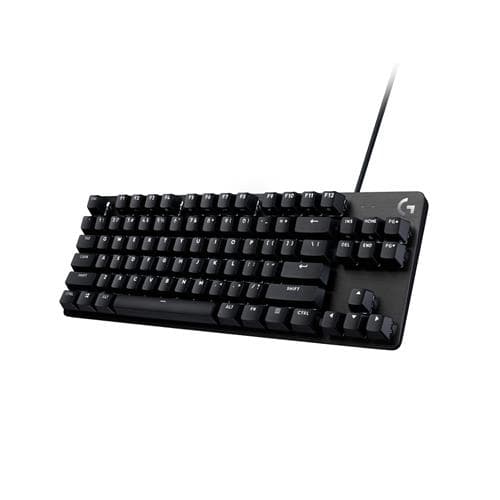
A tenkeyless mechanical keyboard with a solid aluminium top, listed at £73.46. It isn't an obscure brand either. Independent roundups already name the G413 as one of the better sub-£100 mechanical keyboards in the UK, which backs up our own price check with a second source.
Switches: Logitech's own tactile switches, rated for 50g of actuation force. That's a comfortable middle ground, not too light and not too heavy.
Build: A brushed-aluminium top, sturdier and better-looking than the all-plastic tops common at this price. The keycaps are PBT plastic. PBT resists shine and wear from finger oils much better than the cheaper ABS plastic used on a lot of budget boards, including, as it turns out, the pricier keyboard below.
Connection: Wired only, through USB-A. There's no Bluetooth or wireless mode on this model.
Lighting: A single colour of white backlight, not per-key RGB.
Pros:
- Much cheaper than the premium alternative below
- Sturdier aluminium build than most keyboards at this price
- Better keycap material (PBT) than some pricier rivals
Cons:
- Wired only, no wireless option
- Single-colour lighting, not per-key RGB
- No dedicated macro keys
What you'd pay to go premium
Razer BlackWidow V4 X: £153.72 (was £162.99)
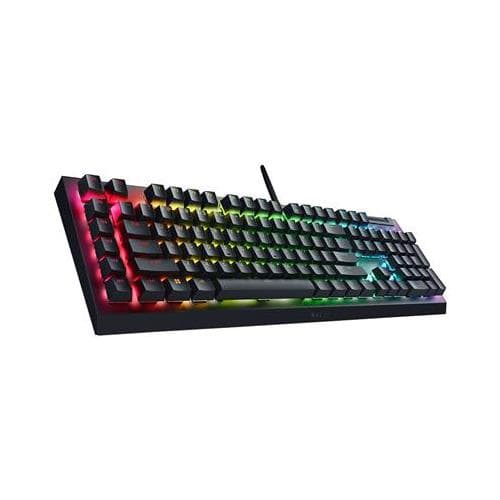
We sell this one too, at the same shop. That makes it a real comparison, not a guess pulled from a different retailer. It costs close to double the G413's price for a specific set of upgrades:
- Switches: A choice of Razer's Green switches (clicky) or Yellow switches (silent), a choice the G413 doesn't offer.
- Lighting: Full per-key RGB lighting, instead of the G413's single white colour.
- Extras: Six dedicated macro keys and a media control roller, both missing on the G413.
- Keycaps: ABS plastic, which wears and picks up shine faster than the G413's PBT keycaps. This is the one place the cheaper keyboard actually wins.
Quick comparison
| Logitech G413 TKL SE | Razer BlackWidow V4 X | |
|---|---|---|
| Price | £73.46 | £153.72 |
| Off RRP | 36% | 6% |
| Layout | Tenkeyless, no number pad | Full size with number pad |
| Switches | Tactile mechanical | Razer mechanical |
| Best for | A smaller desk and a lower spend | Macros, media keys and lighting |
So which one should you buy
If you want a solid mechanical feel, a sturdier build, and keycaps that last longer, the G413 gets you there for close to half the price of a well-known gaming brand. If per-key RGB, macro keys, or a choice of switch feel genuinely matter to your setup, the BlackWidow V4 X is worth paying extra for those specific things.
Verdict: Real mechanical typing for £73.46, priced against the premium option at the same shop, so nothing here is a guess. The G413 even wins on keycap material despite costing less.
A word on noise, if you share a desk or office
Mechanical keyboards are louder than rubber-dome ones, and how loud depends on the switch. Logitech doesn't market the G413's switches as "silent", so expect a noticeable click with every keystroke, closer to a typical mechanical keyboard than a quiet laptop board. The BlackWidow V4 X actually gives you a choice here. Green switches are clicky and loud, built for people who like the sound. Yellow switches are tuned to be linear and quiet, a real option if you're in a shared office or on a video call most of the day. That's a genuine reason to pay more if noise matters to you specifically, separate from RGB or macro keys.
Frequently asked
Am I missing much without a numpad? Just the numpad itself. If you type long strings of numbers often, a full-size board suits you better. For gaming and everyday typing, most people prefer the smaller size because it frees up desk space for mouse movement.
Do these work on Mac as well as Windows? Yes, both work on either system. The brand software (Logitech G Hub, Razer Synapse) used for remapping keys and lighting is mostly built for Windows, though basic typing works fine without it.
Why are both of these wired, not wireless? Neither keyboard here has a wireless mode. That's a real limit on both, not something we're glossing over. If wireless matters more to you than price, that's a different shortlist entirely.
Is 50g actuation force heavy or light? It sits in the middle. Lighter than old-school buckling-spring keyboards, heavier than the lightest gaming-tuned switches. Most typists find it comfortable without much adjustment.
How we priced this
Both prices come from the same place, read live from Quzo UK rather than taken from a manufacturer's RRP or a different shop. That matters here specifically because keyboard prices swing a lot between retailers and sales periods. A comparison built from two different sites can end up pitting a discounted budget board against a full-price premium one, or the other way round, without meaning to.
For more real comparisons like this one, see our picks for a Fitbit Charge 6 alternative and a cheap AirPods alternative with noise cancelling. The rest of the desk and everything else we track is under Electronics & Tech.